oh HACK no!

loading...
loading...
The text lands at 8:47pm: your bank, flagging a charge you didn't make, with a link to "secure your account." The logo's right. The panic's real. The bank isn't the one texting.
A phishing scam is a message that pretends to be someone you trust so you'll hand over a login, a card number, or your money. Here's how the trick is built, why it fools sharp people, and what to do if it already worked.
A phishing scam is a fake message, usually an email, text, or phone call, that pretends to come from a company or person you trust so you'll give up something valuable. That something is usually a password, a card number, a bank login, or a straight payment.
The name comes from fishing, and the idea is the same. The scammer casts out bait that looks legitimate, like an alert from your bank or a delivery notice, and waits for someone to bite.
People fall for phishing because the message is built to switch off careful thinking, not because they missed something obvious. A phishing message works by telling a story designed to get someone to click a link or open an attachment before there's time to think it through (FTC, 2024). That's the whole design.
The good ones are well made. They copy a real company's wording, its logo, even its sender name. Then they lean on a handful of levers that get past the part of your brain that would normally slow down and check.
Urgency The message sets a clock. Your account will be locked, your package returned, your payment declined, all within the hour.
A Trusted Face It impersonates your bank, a delivery company, or a name in your contacts, so the request feels routine.
An Emotion First It hits fear, excitement, or worry before there's a beat to pause, because a rattled reader clicks faster than a calm one.
You don't have to outthink the scammer; you just get to slow down and check through a channel you trust. That single pause does more than any clever eye for detail.
Most phishing arrives looking almost boringly ordinary. That's the skill. The message below copies a real bank alert closely enough that the only off notes are the ones circled, and you'd have to be looking for them to catch them mid-scroll.
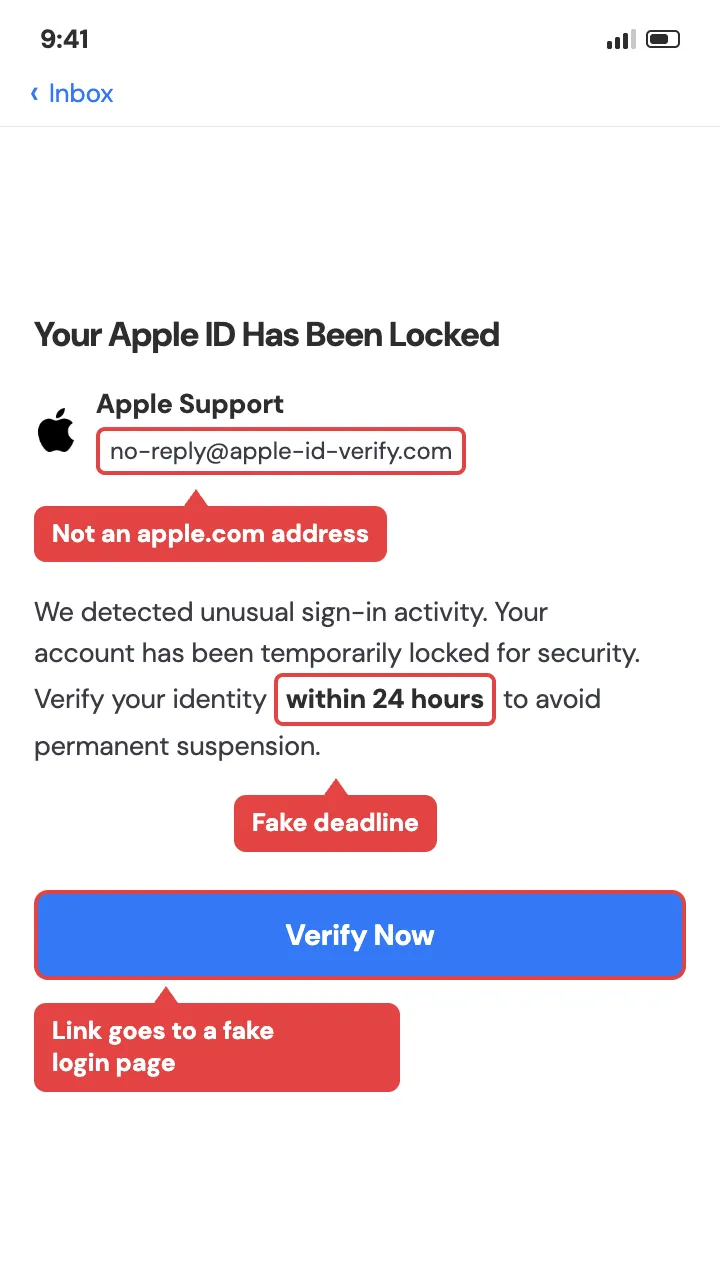
Some versions get craftier. The FTC has flagged a phishing scam that mimics a real "prove you're not a robot" CAPTCHA screen, and following the fake steps can end with malware installed on your own device (FTC, 2025).
Phishing usually gives itself away with the same short list of tells, which is good news if you're wondering how to tell if a text or email is a scam. Once you know the pattern, you spot it faster than you can read the whole message.
An unexpected link asking you to log in, pay, or verify A message that does is a sign of phishing (FTC, 2024). The giveaway: Real companies won't email or text with a link to update payment or account details out of nowhere.
A clock The giveaway: Anything threatening to close, suspend, or delete your account within a set time.
A sender that's almost right The giveaway: A close-but-off email address, an unknown number, or a name that isn't quite the company's real one.
A request that skips the normal channel The giveaway: Real problems get sorted through the app or website you already use, not a link someone sent you.
We've written the per-tell walkthrough separately, with real examples pulled apart line by line. If you want the full version, read how to spot a phishing email. And if you'd rather see the range first, here are common phishing email examples.
One move beats all of these. When a message pushes you to act now, open the app or type the company's website in yourself, never through the link.
It comes down to three payoffs: money, login access, or an identity to use or sell. A stolen password opens a bank account. Card numbers get charged. A Social Security number and a birthday get resold to someone who'll open credit in your name. Phishing is just the cheapest way in.
That's why phishing shows up so often when you look at what phishing is in cyber security. It's the front door to almost everything else.
The volume is real. In 2025, phishing and spoofing complaints to the FBI's crime centre came to roughly 192,000, with reported losses around $215 million (FBI Internet Crime Report, 2025). That figure only counts people who came forward, so the real number of messages sent is far larger.
Phishing takes only small amounts from each person, and that's worth remembering. It works on scale, thousands of small hits, which is why one careful pause on your end ruins the whole model.
Phishing splits mainly by the channel it arrives through: email phishing, text-message phishing (smishing), and phone-call phishing (vishing), plus a targeted version aimed at one specific person (spear phishing). Same trick, different delivery.
Email phishing The classic. An email dressed up as your bank, a retailer, or a service you use, carrying a link to a fake login page or an attachment that installs something. It's the highest-volume version because sending a million emails costs almost nothing. Most start with a scraped address list and a story wide enough to catch anyone, like a failed payment or an account that needs "reconfirming."
Smishing (text-message phishing) Smishing is phishing over SMS, and it's built for the way people read texts, fast, half-distracted, thumb already moving. A short message about a held package, a toll you owe, or a suspicious bank charge, with one tappable link. Texts have no spam filter as good as email's, and a link on a phone hides its real destination more easily. That's why smishing keeps climbing.
Vishing (phone-call phishing) Vishing is the phone-call version, where a live voice or a robocall claims to be your bank's fraud team, the IRS, or tech support. Hearing a person adds pressure a text can't, and the caller ID often shows a real-looking number because it's easy to fake. A real institution won't call and pressure you into a payment or a code on the spot.
Spear phishing Spear phishing aims at one person and does its homework first. Instead of a generic blast, the message uses your name, your employer, a recent purchase, or a colleague's identity to feel personal and legitimate. It takes more effort, so it's usually pointed at higher-value targets, but the payoff per hit is far larger. The personal detail is exactly what makes it land, and exactly what should make you check the source before acting.
AI mostly changes how phishing reads. The old advice to "look for typos and clumsy English" is breaking, because these tools write clean, natural messages in seconds, in any language, with no tell-tale mistakes. It also lets one scammer personalise thousands of messages at once, and powers voice cloning that can mimic a familiar voice on a phishing call.
Here's the part that hasn't changed. The scam still needs you to act on the message itself instead of checking through a channel you already trust. A cloned voice asking for a code still fails the moment you hang up and call the real number. Cleaner writing didn't rewrite the defence. Pause and verify works on the AI version exactly the same way.
Acting fast limits the damage, and this is more fixable than it feels right now. What you do next depends on how far the message got, so find your situation below and start there.
You clicked a link but entered nothing Close the tab or browser and don't enter anything on the page. Run a scan with the security or antivirus software already on your device, and if your phone or computer starts behaving oddly afterward, back up your files and consider a factory reset. Then treat the message as confirmed phishing and delete it.
You entered a password Change it now on the real site or app, and change it anywhere else you used the same one. Turn on the login code your bank or email texts you, so a stolen password alone isn't enough to get in. If it was a bank or payment login, call the number on the back of your card and tell them the account may be compromised.
You sent money or gift cards Contact your bank, card issuer, or the payment app straight away and ask them to stop or reverse the transfer, because speed matters most in the first hours. For gift cards, call the card's company using the number on the card and report it as used in a scam, since some can freeze the balance. Keep every receipt, screenshot, and card number for the report.
A scammer got personal details Go to IdentityTheft.gov for a personalised, step-by-step recovery plan based on exactly what was exposed. It walks you through freezing credit, flagging accounts, and everything else in order.
For the full walkthrough, here's what happens if you click a phishing email.
Report it fast, and report it once, in whatever order fits the time you have. Every route below feeds the people who track and shut these down.
1. Report the message to the FTC This is the main consumer route and takes a few minutes. (ReportFraud.ftc.gov)
2. File with the FBI's crime centre Especially if any money was lost. (ic3.gov)
3. For a scam text, forward it to <strong>7726</strong> (spells SPAM) This sends it to your phone carrier.
4. For a scam email, forward it to <strong>ReportPhishing@apwg.org</strong>
5. Tell the real company or bank the scammer impersonated Use the contact details on their official site or the back of your card.
If you'd talk it through with a person, the AARP Fraud Watch Helpline is free at 877-908-3360. The full step-by-step lives at how to report a phishing email.
Answering a phishing call won't charge you on its own, but staying on the line is where the risk starts. The caller's whole job is to talk you into reading out a code, a card number, or a payment while they've got you on the phone. If a caller claims to be your bank or a government agency and pressures you, hang up and call the real number yourself. No legitimate institution asks for that on an unexpected call.
You've likely been hit if you clicked a link, entered login or payment details, or replied to a message that turned out to be fake. Watch for the signs afterward: unexpected password-reset emails, charges you don't recognise, being locked out of an account, or contacts telling you they got odd messages from you. If any of those show up, treat the earlier message as phishing and change the affected passwords right away.
The real difference is that phishing is built to steal from you, while spam is mostly just unwanted advertising. Spam floods your inbox trying to sell something, and it's annoying but rarely dangerous. Phishing wears a disguise, pretending to be your bank or a company you trust, and its only goal is to trick you into handing over a password, a payment, or personal details. All phishing is unwanted, but not all unwanted mail is trying to rob you.
Replying to a phishing text is risky because it confirms your number is live and read by a real person, which usually brings more messages, not fewer. A reply can also open a back-and-forth the scammer uses to build trust and steer you toward a link or a payment. Don't reply. Forward the text to 7726 to report it, then delete it.
A phishing email usually needs you to type your password into a fake login page for it to be captured, so entering nothing keeps your password safe in most cases. The exception is an attachment or link that installs malware, which can then record what you type in future. So don't open attachments or click links in unexpected messages, even if you never planned to enter anything.
Go back to that bank text from the start. You can now read it the way the scammer hoped you wouldn't. The fake charge, the ticking clock, the link sitting there while you're rattled. Next time a message pushes you to act right now, do the one thing that beats all of it. Shut it, then check through a channel you trust.