oh HACK no!

loading...
loading...
The six phishing email examples on this page each impersonate a brand you'd trust, and each one has a single tell that gives it away. We'll show you the fake, credit what makes it clever, and hand you the one thing to check. No panic required.
The brand at the top (McAfee, PayPal, Apple, Amazon) is borrowed to lower your guard.
The urgency (your account is locked, your card was charged, act in 24 hours) is there to stop you thinking.
The email lands looking like a receipt. It thanks you for renewing your Geek Squad membership, lists an order number, and shows a charge somewhere around $300 to $500 hitting your card. At the bottom sits a phone number and a line telling you to call within 24 hours if you didn't authorise this. The whole thing is built to feel like a mistake you need to fix, fast.
It works because nobody wants to pay for a service they never bought. The design copies a real invoice down to the layout, and the sender knows most people will reach for the phone before they check whether the account even exists.
What happens if you call the number: The person on the line asks for remote access to your computer, then uses it to install spyware, grab your banking logins, and empty the account (FTC, 2022).
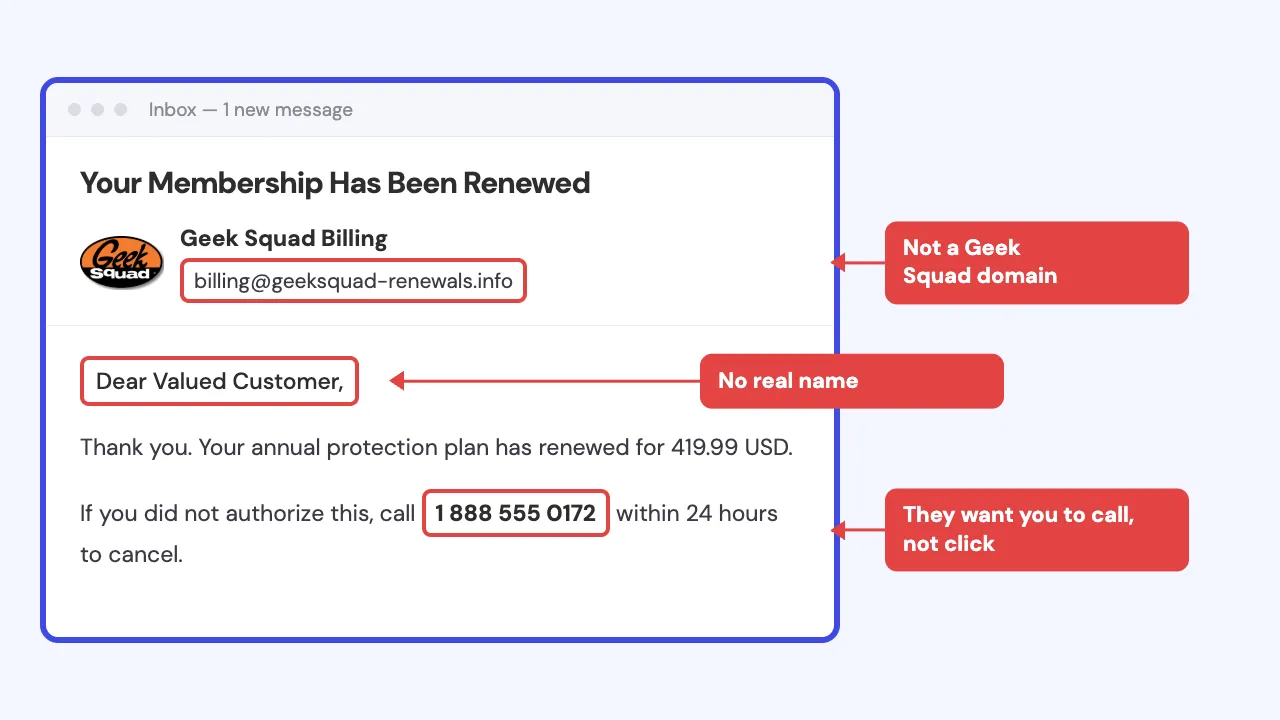
Spot it: The email asks you to call a phone number in response to a billing problem.
Avoid it: Don't call the number in the email. Log into your bank the way you always do and confirm nothing was taken.
The McAfee email scam works the same way as the Geek Squad one, just with a different logo up top. It tells you your antivirus subscription auto-renewed for a few hundred dollars, and it drops in a phone number to "cancel" or "get a refund." Sometimes the message rides on a real fear, that you did once have McAfee, years ago, and can't quite remember.
It works because antivirus renewals are boring enough that people forget them, and expensive enough to make you flinch when the number is big.
Real security companies handle billing inside your online account, not over a phone line printed in an email. The FTC has traced how these tech-support renewal scams end: the caller walks you to a spoofed website that looks like the real one and asks for your bank or card details to process a "refund," then claims they refunded too much and demands you send the difference back by gift card, wire, or a payment app (FTC, 2025).
Spot it: The email asks you to call a phone number to fix a billing problem.
Avoid it: Ignore the number. Check your subscriptions by logging into the actual service, or look at your card statement to see if any charge exists at all.
The PayPal email scam usually arrives as an invoice or a receipt for something you didn't buy. It might say you just sent $649 for a crypto purchase, or that your account will be charged unless you cancel. A phone number sits right there for "disputes," or a button says Cancel Transaction. The email can look genuine because it is sent through PayPal's real invoicing tools.
It works because a receipt for money leaving your account triggers an instant "wait, no" response. And that reaction is exactly what carries you to the phone or the button.
Log into PayPal on your own, through the app or the website you type yourself, and check your activity there. If there's no such transaction, there's no problem.
Spot it: The message pushes you to call a number or click a button to stop a payment.
Avoid it: Don't call, don't click. Open PayPal the way you normally do and look at your real activity.
The DocuSign email scam tells you a document is waiting for your signature, usually something official-sounding like an invoice, a contract, or a delivery agreement. It has a Review Document button. Tap it and you land on a fake login page that harvests your email password, or on a file that starts a download you didn't want.
It works because DocuSign is genuinely used for real, important paperwork. People sign things through it all the time, so a "please sign" email feels routine rather than suspicious.
Press and hold the button (don't tap it) to see the real web address it points to. A random string of letters or a lookalike domain is the giveaway.
Spot it: The "review" link goes somewhere that isn't docusign.com.
Avoid it: If you're genuinely expecting a document, go to docusign.com yourself and log in there. Any real document waiting for you will show up in your account without touching the email link.
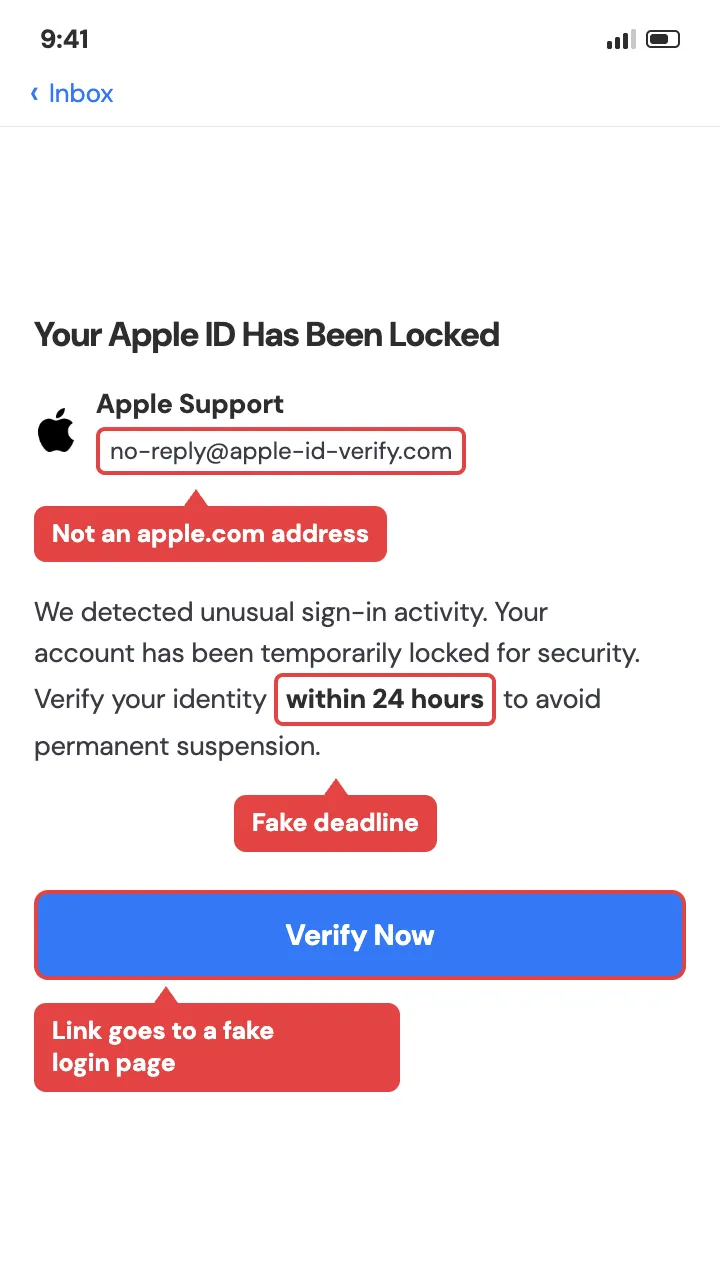
An Apple phishing email tells you your Apple ID has been locked, suspended, or accessed from a new device, and you need to verify your account to unlock it. There's a button to confirm your identity. It leads to a page that looks exactly like Apple's sign-in screen and quietly records your Apple ID and password as you type them.
It works because your Apple ID is the key to your photos, your payments, and your devices, so a threat to it lands hard. The fake login page is often a pixel-perfect copy of the real one.
Apple never asks you to verify your account by clicking a link in an email. Press and hold the button to reveal the destination.
Spot it: The link doesn't go to apple.com.
Avoid it: Don't tap through. If you're worried, open Settings on your iPhone, tap your name at the top, and check your account there directly.
The Amazon phishing email usually claims there's a problem with an order or your account: a purchase you didn't make, a payment method that failed, or a hold that needs verifying. It gives you a button to review the order or update your details, and that button leads to a fake Amazon login page.
It works because almost everyone has an Amazon account and a package in transit at any given moment. A "problem with your order" email has good odds of landing on someone who's actually waiting for something.
Press and hold it to check where it really points. And Amazon shows order and account issues inside your account, not only in an email.
For more on this one, here are the typical Amazon scams that keep going around.
Spot it: The link doesn't go to amazon.com.
Avoid it: Open the Amazon app or type amazon.com yourself and check Your Orders. If there's nothing wrong there, the email is the problem, not your account.
Four habits catch every scam on this page, no matter which brand is on the envelope.
Verify on a number or address you looked up yourself Type the address yourself. Use the number on the back of your card. (FTC, 2026) The giveaway: If a message claims to be from a company you have an account with, contact that company through a phone number or website you already know is real, never the contact details printed in the email.
Never pay with a gift card A request for one is a scam, every time, with no exceptions. The giveaway: No real company bills you or refunds you through gift cards.
Let unknown numbers go to voicemail If it isn't, you've lost nothing. The giveaway: If a call is genuine, they leave a message and you can call back on a number you trust.
Acting quickly limits the damage, and most of this is fixable. Find the line below that matches what happened and take the one action next to it.
You clicked the link but typed nothing. You're likely fine. Close the page and don't enter anything. To be safe, run a scan with the security software already on your device.
You entered a login (Apple ID, Amazon, PayPal, email). Change that password now, using the app or website you open yourself, and turn on two-factor authentication, the code the service texts you when you sign in. If you use that same password anywhere else, change it there too.
You gave card or bank details. Call your bank on the number printed on your card and tell them. Ask them to watch the account or issue a new card.
You paid by gift card. Contact the card's company right away with the receipt and card number, and ask them to freeze the funds. Some money has been recovered this way when people moved fast.
For the full walkthrough, here's what to do when you click a phishing email. None of this depends on how the message got through. It only depends on what you do next, and you're already doing it.
Report it in this order, shortest route first.
1. Use the platform's own report control. In Gmail, tap the three dots on the email and choose Report phishing. In the Apple Mail app, mark it as junk. Reporting inside the app you received it in is the fastest step.
2. Forward the email to the Anti-Phishing Working Group The FTC points people here for phishing emails specifically (FTC, 2026). (reportphishing@apwg.org)
3. Forward scam texts to 7726 That spells SPAM. Your carrier uses these to block the sender.
4. Report it to the FTC and FBI Report at reportfraud.ftc.gov and, if money moved, to the FBI's Internet Crime Complaint Center at ic3.gov. The FBI logged about $216 million in phishing and spoofing losses reported by people in 2025 (FBI Internet Crime Report, 2025). That's the figure from people who came forward, not a count of everyone it happened to. (reportfraud.ftc.gov)
5. Call your bank If any money left an account, call on the number on your card.
6. Talk to a real person if you want one. The AARP Fraud Watch Helpline is free and open to anyone: 877-908-3360.
Here's the full guide to reporting a phishing email if you'd like it walked through.
Phishing emails are coming in all shapes and forms but the underlying approach is always the same. If the phishing email signals urgency and fear - back up and contact the company through their official channels.